Amazon Quick Starts for data sync between RDS and Salesforce using Appflow
Trantor deployed Quick Starts for a new virtual private cloud with default parameters builds the Amazon AppFlow environment in the AWS Cloud.
Business problem
Dependencies on third-party tools.
Asynchronous replication of data from source to target.
The cost associated with the existing solution.
Low ROI, even for a few tables being synced.
No option of customizing field-level synchronization.
No insights into error logs being generated for the process.
Solution delivered
Deploying this Quick Start for a new virtual private cloud (VPC) with default parameters builds the following Amazon AppFlow environment in the AWS Cloud.
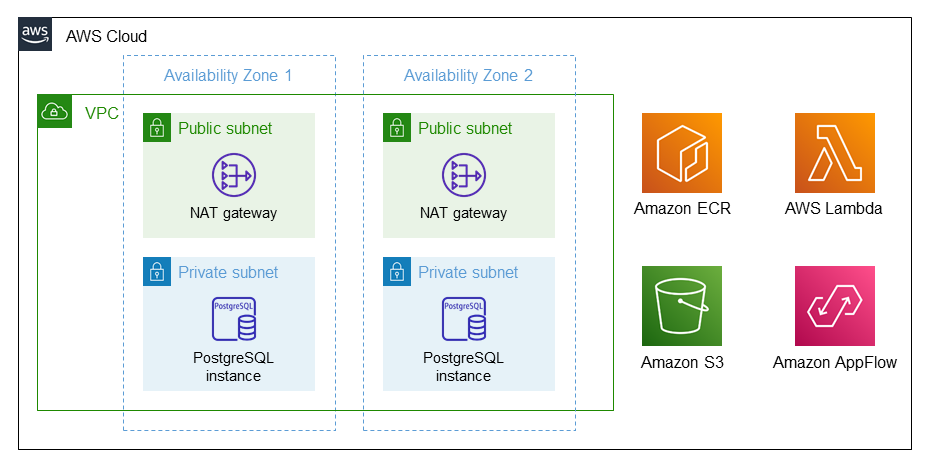
As shown in Figure 1, the Quick Start sets up the following:
A highly available architecture that spans multiple Availability Zones.*
A VPC configured with public and private subnets, according to AWS best practices, to provide you with your own virtual network on AWS.*
In the public subnets, a managed network address translation (NAT) gateway allows outbound internet access for resources in the private subnets.*
In the private subnets, an Amazon RDS PostgreSQL database.
Amazon Elastic Container Registry (Amazon ECR) to store Docker images.
Amazon Simple Storage Service (Amazon S3) to store Salesforce object data.
An Amazon AppFlow flow, created by an AWS Lambda function, to transfer Salesforce data to Amazon RDS and Amazon S3.
* The template that deploys the Quick Start into an existing VPC skips the components marked by asterisks and prompts you for your existing VPC configuration.
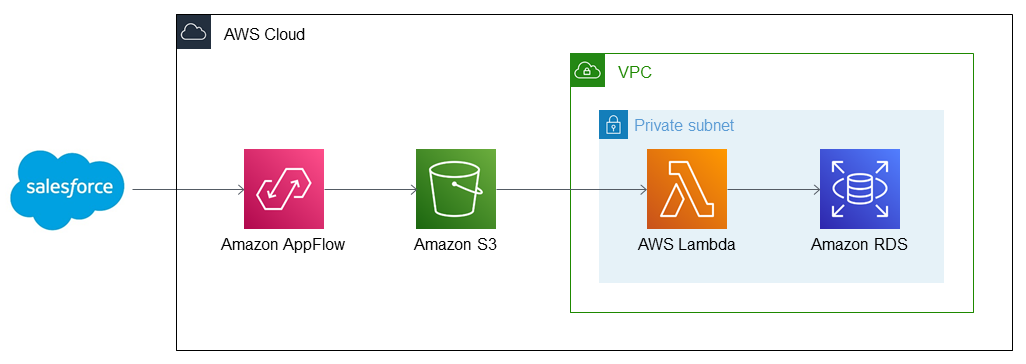
As shown in Figure 2, this Quick Start sets up the following workflow:
Salesforce object data is transferred to Amazon AppFlow.
Amazon AppFlow relays Salesforce data to Amazon S3.
Amazon S3 relays object data to AWS Lambda, which sits inside a private subnet of your VPC.
AWS Lambda transfers your Salesforce data to Amazon RDS.