Mobile App Development, zBlog
Top Mobile App Development Tools in 2026: The Complete Updated Guide
Team Trantor | Updated: August 3, 2026
What are the top mobile app development tools in 2026?
The top mobile app development tools in 2026 are Flutter and React Native for cross-platform development, Swift with SwiftUI for native iOS, Kotlin with Jetpack Compose for native Android, Kotlin Multiplatform for shared business logic, Firebase or Supabase for backend services, Figma for design, and Maestro for mobile UI testing. GitHub Copilot and Cursor have become standard AI coding assistants across all of these stacks.
Mobile app development tools have changed more between 2023 and 2026 than they did in the five years before that. Xamarin, which appeared in dozens of “top mobile tools” lists as recently as 2023, was deprecated by Microsoft in May 2024. Adobe XD, which was listed alongside Figma in most design tool comparisons, has been in maintenance mode with no new features since 2023 and is now effectively replaced by Figma in professional workflows. The React Native New Architecture, which was experimental when most existing mobile tools guides were written, went stable in 2024 and changed how developers evaluate the framework. And three entirely new categories have emerged: AI-assisted coding tools embedded directly in mobile IDEs, no-code mobile builders like FlutterFlow and Glide, and Supabase as a serious open-source alternative to Firebase.
This guide is the updated reference for mobile app development tools in 2026. It covers every major category with current adoption statistics, explains what has changed and why, flags what is deprecated, and gives you a decision framework for choosing the right combination of mobile app development tools for your specific build type.
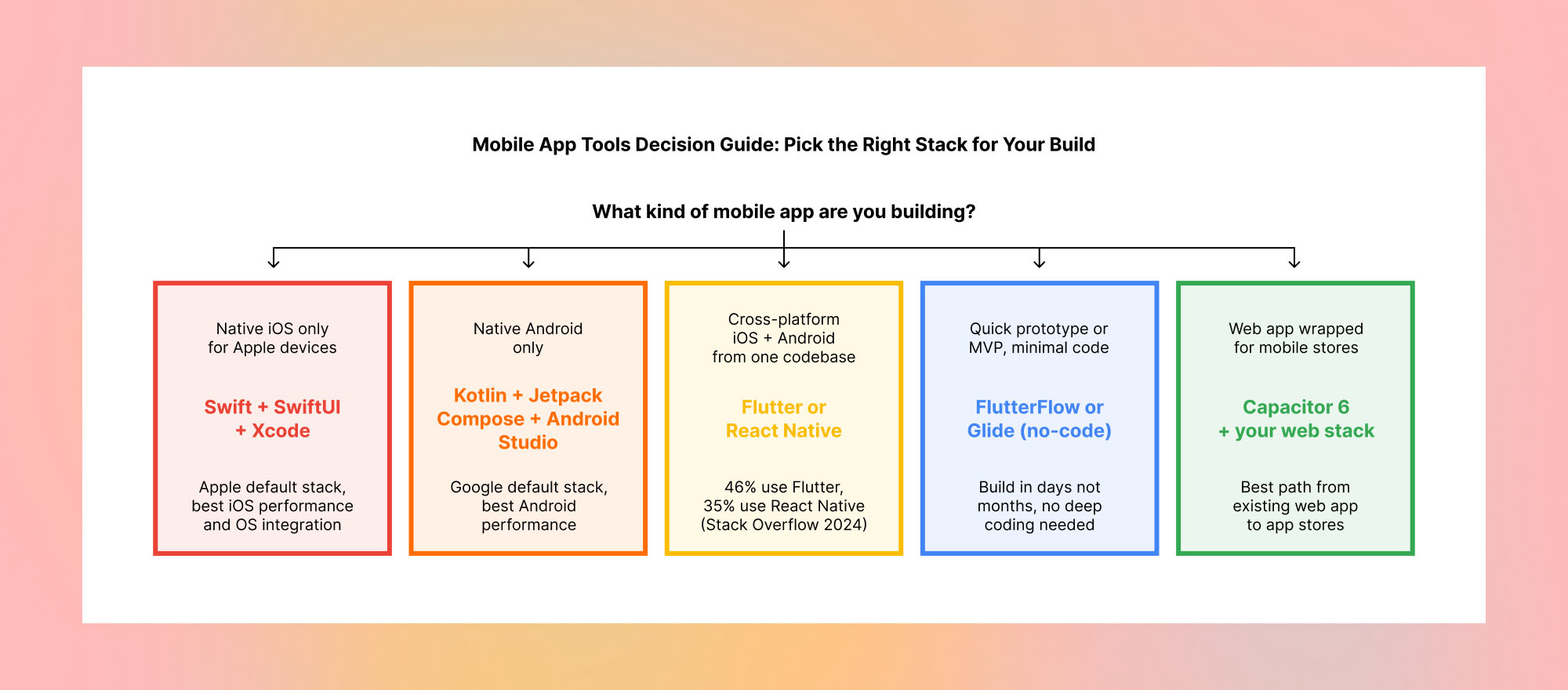
One important orientation before the tool-by-tool breakdown: the most consequential choice in mobile app development is not which specific tools you pick within a category. It is which approach you take: native iOS and Android separately, cross-platform with one shared codebase, or no-code for rapid prototyping. That decision determines which tools are relevant to you, so we cover it first.
Native, Cross-Platform, or No-Code: Choose Your Approach First
The right mobile app development tools depend entirely on which approach you are using. Choosing tools before choosing your approach is the most common mistake in mobile development planning, because the best testing tool for a Flutter app is completely different from the best testing tool for a native iOS app, and neither matters if you are building with a no-code tool.
Native, Cross-Platform, or No-Code: Choose Your Mobile App Approach
| Native iOS + Android | Cross-Platform | No-Code | |
|---|---|---|---|
| Performance | Best possible | Near-native (New Architecture) | Good for most apps |
| Dev time | Slowest: two separate codebases | Fastest: one codebase, both platforms | Fastest overall: no coding needed |
| Cost | Highest: two native teams | Lower: one shared codebase | Lowest: no developer needed |
| Best for | Apps needing max OS integration, gaming, ARKit | Majority of production apps in 2026 | MVPs, prototypes, internal tools, simple apps |
| Native iOS + Android | |
|---|---|
| Performance | Best possible |
| Dev time | Slowest: two separate codebases |
| Cost | Highest: two native teams |
| Best for | Apps needing max OS integration, gaming, ARKit |
| Cross-Platform | |
|---|---|
| Performance | Near-native (New Architecture) |
| Dev time | Fastest: one codebase, both platforms |
| Cost | Lower: one shared codebase |
| Best for | Majority of production apps in 2026 |
| No-Code | |
|---|---|
| Performance | Good for most apps |
| Dev time | Fastest overall: no coding needed |
| Cost | Lowest: no developer needed |
| Best for | MVPs, prototypes, internal tools, simple apps |
The Complete Mobile App Development Tool Landscape in 2026
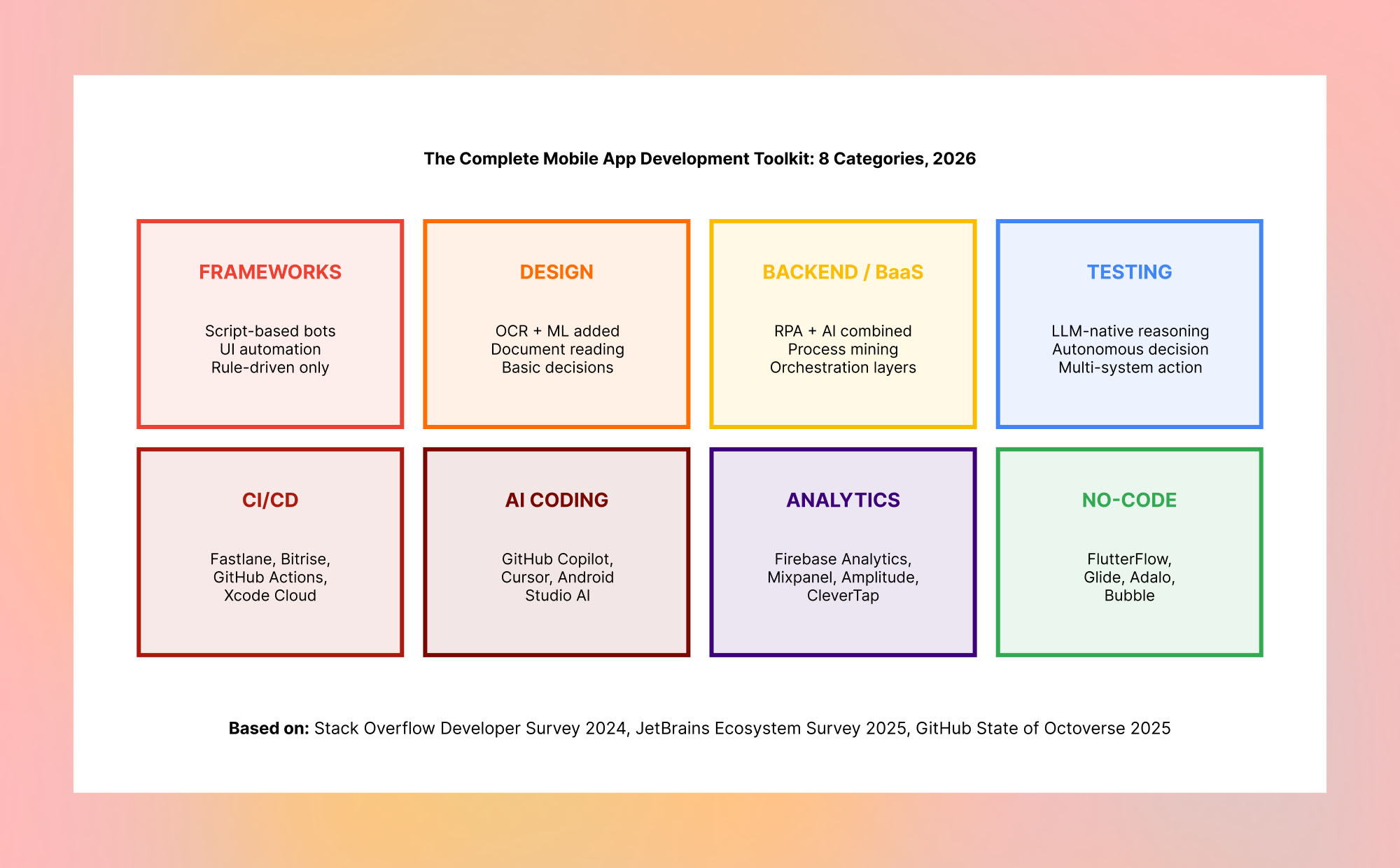
Mobile App Development Frameworks: What Developers Are Actually Using
Frameworks are the foundational choice in mobile app development tools because every other tool decision flows from it. Here is the current adoption picture with real developer survey data.

Flutter
The leading cross-platform mobile app development tool, used by 46% of cross-platform developers and backed by Google.
Current version: Flutter 3.x, with Impeller rendering engine as default on iOS and Android, significantly improving graphics performance over the old Skia renderer
Language: Dart, which has a learning curve for developers coming from JavaScript or Kotlin but provides strong typing and fast compilation
Platform support: iOS, Android, web, macOS, Windows, and Linux from a single codebase, making it the broadest platform support of any mobile app development framework
Adoption stat: 46% of cross-platform developers (Stack Overflow 2024). Used by Google Pay, eBay Motors, BMW app, and Alibaba Xianyu
Best for: Teams wanting maximum platform coverage from one codebase, pixel-perfect custom UI, and strong performance on lower-end Android devices
Watch for: Dart is not a language developers typically know before learning Flutter, which adds onboarding time. Web output is still maturing compared to native web frameworks
React Native
The second most widely used cross-platform mobile app development framework, backed by Meta and with a major architecture upgrade in 2024.
Current version: React Native 0.73+ with the New Architecture (JSI, Fabric, TurboModules) now stable. This is a major change from older React Native that addressed many historical performance criticisms
Language: JavaScript and TypeScript, which means the largest pool of available developers and the most straightforward onboarding for web development teams
Expo: Expo SDK 51+ has made React Native significantly more accessible, handling most of the native configuration that previously required significant mobile expertise
Adoption stat: 35% of cross-platform developers (Stack Overflow 2024). Used by Meta, Microsoft, Shopify, Coinbase, and Wix
Best for: JavaScript and TypeScript teams, organizations with existing web codebases they want to extend to mobile, and teams that want access to the largest developer hiring pool
Watch for: The New Architecture migration is necessary for best performance but requires updating third-party libraries that may not yet support it
Kotlin Multiplatform (KMP)
The newest stable cross-platform mobile app development tool, sharing business logic across iOS and Android while keeping native UI on each platform.
Status: Kotlin Multiplatform went production-stable in November 2023. This is a major milestone that most pre-2024 mobile tools guides have not yet reflected
Approach: KMP shares business logic, data models, and networking code between iOS and Android while keeping the UI native on each platform (SwiftUI on iOS, Jetpack Compose on Android). This is different from Flutter and React Native, which also share the UI layer
Adoption: 20% of cross-platform developers (JetBrains 2025), growing fast. Backed by JetBrains, used by Netflix, VMware, and Philips
Best for: Teams with strong native iOS and Android engineers who want to eliminate duplicated business logic without giving up native UI quality
Watch for: Requires more total development investment than Flutter or React Native because the UI is still written separately for each platform. Best suited for teams that already have native mobile expertise
Swift with SwiftUI (Native iOS)
The Apple-native stack for iOS development, now the production default for new iOS apps in 2026.
Current status: SwiftUI is now the recommended default for new iOS app development, having matured from a “preview” framework in 2019 to a production-stable standard across iOS 16 and above
Tool: Xcode 15+ is the required IDE. Apple Intelligence features (AI capabilities in iOS 18+) are only accessible through the native Swift stack, which is the strongest argument for native iOS development in 2026
Best for: Apps requiring maximum iOS performance, deep OS integration (Live Activities, Dynamic Island, WidgetKit, ARKit, Core ML), and Apple platform-first products
Watch for: Building iOS-only means building Android separately with a different team and codebase, which doubles the ongoing maintenance investment
Kotlin with Jetpack Compose (Native Android)
The Google-native stack for Android development, fully replacing Java and XML layouts as the recommended approach.
Current status: Kotlin is now the officially recommended language for Android development, with Java legacy support but no new Google features being added to Java APIs. Jetpack Compose is the modern UI toolkit that replaces XML layouts with declarative Kotlin UI
Tool: Android Studio (Hedgehog 2023.1 and above) includes built-in AI assistance, Gemini integration for code generation, and the Compose preview that makes UI development significantly faster
Best for: Apps requiring deep Android OS integration, maximum Android performance, or access to the latest Google Play and Pixel device features
Watch for: Same maintenance cost as native iOS: a separate codebase from any iOS development, requiring different engineers with different skills
Mobile App Development Tools That Are Deprecated or Declining in 2026
DEPRECATED: Xamarin — Microsoft deprecated Xamarin in May 2024. It reached end of life on May 1, 2024. If you are still building new apps on Xamarin, migrate to .NET MAUI, which is Microsoft’s supported successor. Any “top mobile tools” guide published before mid-2024 that still lists Xamarin as a recommended choice is giving you outdated advice.
DECLINING: Adobe XD — Adobe XD has been in maintenance mode since 2023 with no new features. Adobe’s $20 billion acquisition of Figma was blocked by regulators in December 2023, and Adobe subsequently ended active XD development. Most professional mobile design teams have migrated to Figma. If you are still using Adobe XD for new projects, plan your migration to Figma now rather than later.
DECLINING: Apache Cordova — Cordova, the original web-to-mobile wrapper tool, has been effectively replaced by Capacitor 6 for most use cases. Capacitor is built by the Ionic team, provides a much better developer experience, has active maintenance and regular updates, and supports modern web capabilities that Cordova does not. New projects should start with Capacitor, not Cordova.
Design Tools for Mobile App Development
Figma: the unambiguous industry standard for mobile UI design in 2026. Figma is used by the large majority of professional mobile design teams for wireframing, high-fidelity UI design, prototyping, and developer handoff. Its Auto Layout feature, component libraries, and dev mode (which gives developers direct access to design specifications and CSS/Swift/Kotlin code snippets) have made it the single tool that covers the entire design-to-development handoff workflow.
Sketch: still used by teams that were on it before Figma became dominant, particularly macOS-only teams. Sketch has not kept pace with Figma on collaboration features, but its plugin ecosystem and native performance on Mac remain strengths for teams that stayed on it.
Zeplin and InVision: design handoff and prototyping tools that many teams use alongside Figma. Both have seen usage decline as Figma’s built-in dev mode reduces the need for separate handoff tools, but they remain common in organizations with established workflows built around them.
Backend and BaaS Tools for Mobile App Development
Firebase (Google)
The dominant backend-as-a-service for mobile apps, now part of the Google Cloud platform with expanded enterprise features.
What it provides: Real-time database (Firestore), authentication with social login, cloud functions, hosting, push notifications (FCM), A/B testing, remote config, and crash reporting through Crashlytics
Adoption: Firebase Authentication and Firestore are used in a majority of consumer mobile apps built with Flutter and React Native due to the mature SDKs and minimal setup overhead
Best for: Consumer apps that need real-time features, social authentication, and a complete backend without dedicated backend engineering resources
Watch for: Firebase costs can scale unexpectedly as an app grows. Read pricing carefully before assuming Firebase is free at scale. Many teams hit surprise bills when their app grows beyond the free tier limits
Supabase: the most significant new backend tool in mobile app development since Firebase itself. Supabase is an open-source Firebase alternative built on PostgreSQL, with real-time subscriptions, authentication, storage, and auto-generated REST and GraphQL APIs. With 80,000+ GitHub stars and a managed cloud option, it gives teams the developer experience of Firebase with the data flexibility of a relational database and the option to self-host. Teams that need relational data models or want to avoid vendor lock-in are increasingly choosing Supabase over Firebase for new projects in 2026.
AWS Amplify: Amazon’s backend-as-a-service for mobile apps, most commonly chosen by organizations already running on AWS infrastructure or with specific compliance requirements that require keeping data within a controlled AWS environment.
Testing Tools for Mobile App Development
Maestro: the most significant new mobile testing tool of the 2023 to 2026 period, and the one most likely missing from older mobile tools guides. Maestro is an open-source mobile UI testing framework that uses a YAML-based flow definition to describe test interactions in plain language rather than code. It works on both iOS and Android from the same test definition and handles flakiness better than traditional UI testing frameworks. Many teams that struggled with brittle Espresso or XCUITest tests have switched to Maestro for end-to-end mobile UI testing.
Detox: the leading end-to-end testing framework for React Native apps, built by Wix and widely adopted in the React Native community. Detox handles the asynchronous nature of React Native better than generic mobile UI testing frameworks.
XCTest and XCUITest: Apple’s built-in testing frameworks for native iOS and Swift apps. For teams building native iOS apps, XCTest is the standard unit and integration testing approach, and XCUITest handles UI automation.
Firebase Test Lab: cloud-based mobile app testing on real Android and iOS devices, integrated into the Google Cloud ecosystem. Particularly useful for testing an app across a range of real device models and Android OS versions that are impractical to maintain as a physical device lab.
AI Coding Tools for Mobile App Development (New in 2026)
AI-assisted coding has become a standard part of professional mobile app development workflows in 2026. This is an entirely new category that did not meaningfully exist when most mobile tools guides were written, and it is one of the highest-leverage productivity tools available to mobile development teams.
GitHub Copilot: the market-leading AI coding assistant, now with native Xcode and Android Studio integration. Copilot autocompletes Swift, Kotlin, Flutter/Dart, and React Native TypeScript in context, suggests entire function implementations, generates test cases, and provides inline documentation. GitHub reported that developers using Copilot complete tasks 55% faster on average.
Cursor: an AI-native code editor built on VS Code that has become popular with React Native teams and Flutter developers who work in a VS Code-based environment. Cursor integrates AI chat, inline code generation, and codebase-wide context understanding more deeply than Copilot’s plugin model.
Android Studio AI (Gemini integration): Google has integrated Gemini directly into Android Studio, providing AI code completion, code generation from natural language descriptions, crash analysis, and documentation generation within the native Android development environment.
No-Code and Low-Code Mobile App Development Tools
No-code and low-code mobile app development tools represent a third path that sits between native or cross-platform development and pure web. They have grown substantially since 2022 and are now a legitimate choice for specific categories of mobile app.
FlutterFlow: a visual builder for Flutter apps that generates real Flutter code rather than a proprietary binary output. Teams can build the UI and basic functionality visually, then export the generated Dart code to extend it with custom logic. Used by non-engineers to prototype Flutter apps and by engineers to accelerate boilerplate-heavy development.
Glide: turns Google Sheets or Airtable data into mobile apps with no code. Best for internal tools, simple data-driven apps, and organizations that need mobile access to spreadsheet data without building a custom app.
Adalo: a no-code mobile app builder focused on database-driven apps with a visual component model. More capable than Glide for complex data relationships but requires more setup.
Bubble: primarily a web app builder but with mobile-responsive output and a large plugin ecosystem. More commonly used for web apps than native mobile, but worth mentioning as part of the no-code landscape.
NO-CODE HONEST CAVEAT: No-code mobile app development tools are excellent for prototypes, MVPs, internal tools, and simple consumer apps. They have real limitations for production apps that require complex custom logic, high performance, access to native device APIs, or significant customization beyond the platform’s built-in capabilities. Be honest about which category your project falls into before committing to a no-code approach.
CI/CD and Deployment Tools for Mobile App Development
Fastlane: the most widely used open-source automation tool for iOS and Android app deployment. Fastlane automates code signing, building, testing, and submission to the App Store and Google Play. It integrates with GitHub Actions, Jenkins, Bitrise, and most CI/CD platforms.
Bitrise: a CI/CD platform built specifically for mobile app development, with native iOS and Android build environments and extensive integrations with testing services, app distribution platforms, and notification tools.
GitHub Actions: increasingly used for mobile CI/CD, particularly by teams already using GitHub for source control. With macOS runners for iOS builds and Linux runners for Android, GitHub Actions handles most mobile CI/CD requirements and is often more cost-effective than dedicated mobile CI/CD platforms for smaller teams.
Xcode Cloud: Apple’s native CI/CD service for iOS and macOS apps, integrated directly into Xcode and App Store Connect. For iOS-only teams already in the Apple ecosystem, Xcode Cloud offers the simplest setup path.
Frequently Asked Questions About Mobile App Development Tools
Q: What are the best mobile app development tools for Android in 2026?
The top mobile app development tools for Android in 2026 are Android Studio as the official IDE, Kotlin as the recommended programming language (over Java for new projects), Jetpack Compose as the modern UI toolkit replacing XML layouts, Firebase or Supabase for backend services, Maestro or Detox for UI testing, and GitHub Copilot for AI-assisted coding. For cross-platform development that includes Android, Flutter is used by 46% of cross-platform developers and React Native by 35% according to the Stack Overflow Developer Survey 2024. Kotlin Multiplatform is a growing option for sharing business logic between Android and iOS while keeping native UI.
Q: Should I use Flutter or React Native in 2026?
Both Flutter and React Native are strong choices for cross-platform mobile app development in 2026, and the decision depends primarily on your team’s language background. Flutter uses Dart and is used by 46% of cross-platform developers. React Native uses JavaScript and TypeScript and is used by 35%. Flutter provides slightly better performance and more consistent UI across platforms because it renders its own widgets. React Native with the New Architecture (stable since 2024) has closed most of the performance gap and offers a larger developer hiring pool since JavaScript skills are more common. Choose Flutter if your team can learn Dart and you want maximum UI consistency. Choose React Native if your team already knows JavaScript and TypeScript.
Q: What happened to Xamarin and should I still use it?
Microsoft deprecated Xamarin on May 1, 2024. It reached end of life and no longer receives security updates or new features. If you are building new mobile apps, do not use Xamarin. Microsoft’s supported replacement is .NET MAUI (Multi-platform App UI), which provides a migration path for existing Xamarin apps and a forward-compatible cross-platform framework for new projects. Any “top mobile app tools” list that still includes Xamarin without this deprecation note was written before May 2024 and has not been updated.
Q: What is the best free mobile app development tool?
The best free mobile app development tools in 2026 are Android Studio (completely free for Android development), Xcode (free for iOS development on a Mac), Flutter (open source, free), React Native (open source, free), Supabase (open source with a generous free cloud tier), and Firebase (free tier covers most small to medium app requirements). Figma offers a free tier for individual designers and small teams. GitHub Copilot has a free tier for individual developers. The only major mobile development tool category that does not have a meaningful free option is enterprise-grade CI/CD, where Bitrise and Xcode Cloud both charge for meaningful build minutes.
Q: What mobile app tools should I use for a quick prototype or MVP?
For a quick prototype or MVP, the fastest path depends on your team’s skills. If you have mobile developers, Flutter or React Native with Expo for cross-platform and Firebase or Supabase for the backend gets to a working prototype in days rather than weeks. If you do not have mobile developers, FlutterFlow for a Flutter-based visual build or Glide for a simple data-driven app can produce a working prototype with no code. For the quickest possible path with no technical skills, Glide connected to a Google Sheet or Airtable database can produce a functional internal app in hours.
Q: Is Firebase still the best backend for mobile apps in 2026?
Firebase remains the most widely used backend-as-a-service for mobile apps, particularly for consumer apps built with Flutter and React Native that need real-time features and social authentication. However, Supabase has emerged as a strong alternative for teams that prefer an open-source, relational database approach or want to avoid vendor lock-in. Supabase uses PostgreSQL, provides auto-generated APIs, supports real-time subscriptions, and offers a self-hosted option. Teams choosing between Firebase and Supabase should consider whether they need a document database (Firebase Firestore) or a relational database (Supabase on PostgreSQL), and whether the option to self-host matters for their compliance or cost requirements.
Building Mobile Apps in 2026: The Bottom Line on Tool Selection
The mobile app development tool landscape in 2026 is more capable and more complex than at any point in its history. The good news is that the right tool choices have also never been clearer. Flutter and React Native have both matured into production-ready cross-platform mobile app development tools that cover the vast majority of use cases. Native development with Swift and Kotlin remains the right choice for apps requiring maximum OS integration. Kotlin Multiplatform fills the gap for teams that want shared logic with native UI. And no-code tools like FlutterFlow and Glide make mobile app development accessible for teams without mobile engineering resources.
The most important step before selecting specific mobile app development tools is choosing your approach: native, cross-platform, or no-code. Everything else follows from that decision, and getting it right saves months of expensive rework later in the project.
At Trantor, we build mobile apps across the full range of mobile app development tools: native Swift and Kotlin for platform-specific performance, Flutter and React Native for cross-platform efficiency, and Firebase and Supabase for backend services. We stay current on the mobile tooling landscape precisely so our clients do not need to: we knew Xamarin was being deprecated before the announcement, we adopted Flutter’s Impeller renderer at launch, and we integrated AI coding tools into our mobile development workflows in 2024. If you are planning a mobile app and want to make the right tool choices from the start, we are ready to help.
Explore Trantor’s Mobile App Development Services: Software Development